
A free versatile image viewer app
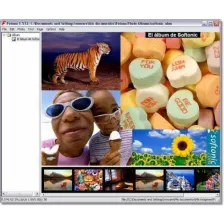
CPix is a free image viewer program that enables you to easily check out image files in different formats. Developed by FileFriend, this handy multimedia tool is compact and fast, supporting a variety of image formats, format conversion, and even encryption. It also offers other basic features commonly found in photography-editing software. This is a great choice if you find that your usual app is slow in loading your pictures.
Full of functionality
CPix works just like any image viewer application but it has a surprising amount of functionality when it comes to formatting. For one, it can convert your images and even do so with batch processing. It can also resize pictures and do batch resizing, allowing you to choose your custom widths and heights. This program generally supports most of the popular formats, such as JPEG, GIF, PNG, APNG, TIFF, BMP, to name a few.
It also supports special formats like MPO (Multi-Picture Object), EMPO (Encrypted MPO), EJPG (Encrypted JPEG), PL (Photo List), and EPL (Encrypted PL). There’s a DualPhoto format exclusively for this program as well. This format contains two JPEG images in a single file—the second image already encrypted. Additionally, you can play animations using this tool. You can go to the settings to configure its play speed and enable or disable auto-play.
There are other customization options in the settings, too. For one, you can choose the photo orientation for image-loading and format conversion. You can select a background color, effects like brightness and tone, and the image order that the files will be displayed in. This software even lets you do frame-by-frame viewing. However, the biggest downside here is that some features don’t allow certain formats when you use them—for example, resizing is only for JPEG, BMP, and PNG.
A great option
All in all, CPix is a highly versatile multimedia program with a user-friendly interface—especially when compared against most default photo viewers. While not all of its features can accommodate all of the formats that it can view, these are still useful tools to have. This application is greatly recommended to anyone looking for more functionality in their image viewer apps. Best of all is that it’s completely free to use.






























User reviews about CPix
Have you tried CPix? Be the first to leave your opinion!